Tuesday, September 13, 2011

New Heartfelt Creations Christmas Cheer Collection

Today is the new release of the Heartfelt Creations Christmas Cheer Collection.  As you know, I am always excited to see each new Heartfelt Creations collection and this one is just fabulous for creating all your holiday cards.  This collection features 14 new precut stamp sets that coordinate with one new exclusive Heartfelt Creations die manufactured by Spellbinders and images that will coordinate with existing Spellbinders dies. The possibilities with the classic images in this collection are absolutely endless. You will achieve handmade projects that will "wow" your friends and family this Christmas season. 

It is an honor for Joan and I to be featured again this month in the September "Papers and Pixels" online magazine and we wanted to feature Heartfelt Creations stamps.  For one of the tutorials I prepared for the magazine this month, I used the gorgeous "Holiday Poinsettia Candle Precut set" (HCPC 3419).  This is a pop-up card and I believe one of the most beautiful cards I have ever designed.  The poinsettias in this new Heartfelt Creations collection are a "dream" to work with.  There are matching Spellbinder dies for the poinsettias.  You are going to have to wait and read the tutorial in the Papers and Pixels magazine which comes out Sept 15.  


I created a lot of cards for this new Heartfelt Creations release and you can see them at Joan's Gardens along with pictures of the 14 new stamps sets and dies in this Christmas collection.  If you love this collection as much as I do, you will want to check out the savings for the "I want it all" package. Since we featured Heartfelt Creations in the September issue of Papers and Pixels, Joan's Gardens has a coupon in the magazine for a savings on Heartfelt Creations stamps.  Be sure and check it out.

For the card above, I wanted to show you another way to use the pretty "Holiday Poinsettia Candle PreCut Set" (HCPC 3419).  I started off by using a pretty gold embossed frame I had in my Christmas supplies.  Under the opening of the frame I used a Cheery Lynn Lattice (FRM115).  It was die cut using ivory card stock then sponged with Tim Holtz "Tea Dye Distress Ink" then attached to a piece of green card stock and placed behind the frame.  The candle was gold embossed on white card stock.  The flowers on the base of the candle were gold embossed three more times and cut apart in order to layer them for dimension.  Using the two middle size poinsettia layers from the "Petite Poinsettia PreCut Set" (HCPC 3415) two of the larger layers were gold embossed as well as one of the smaller layers.  All the coloring was done with watercolors.  I love the way the watercolor flows inside the embossed areas.  Gold Stickles was used in the center of the flowers and on the flame of the candle.  Diamond glitter was added to the top of the melting candle.  To complete this card gold pearls were added to the lattice.

I hope you will go over to Joan's Gardens to see the other cards I created for this release.  Each day this week I will be posting one of those cards and give you information about how it was completed.  Be sure to go over to Joan's Gardens to see all the stamp sets and dies in this new Heartfelt Creations Christmas Cheer Collection.  Also don't forget to go over to Paper's and Pixels to see my tutorial for the top card on this post and to find the Joan's Gardens discount on your next order of Heartfelt Creations stamps.

313353

Monday, September 12, 2011

LaBlanche Santa with Music


Have you seen all the beautiful LaBlanche Christmas stamps now in stock at Joan's Gardens?  I really love how easy they are to color with Distress Inks and Nibs.  For my background I used a piece of design paper paper from the Graphic 45 "Christmas Emporium" paper pad.  When I was going through looking for the right background, this paper really jumped out at me and I love it behind this scene.  Along the bottom I created a border using another piece of design paper from this same paper pad and die cut the new Spellbinders "Classic Triple Scallop" border.  There are 3 dies in this set but I only used two.  A strip of gold card stock was placed across the top of this border.  The LaBlanche Santa was stamped on the LaBlanche Specialty Paper then colored.  The edges were torn around the design, then using the Tim Holtz Blending Tool, Tea Dye Distress Ink was blended over the whole design except Santa's hair.  It was placed at an angle on the front of the card.  Gold cording was wrapped around the top and a bow made with the cord and attached with a glue dot.  I had some Flower Vintage Trinkets,  I had gotten from Joan's Gardens, that were placed on the front of the card.   I keep saying I can't do "Vintage" but I sure have fun trying.

I have been very busy designing a lot of new cards for the upcoming Heartfelt Creations Christmas release, which comes out Wednesday.  There are 14 new stamps sets that Joan will add to her blog and I have tried to create a variety of cards to give you lots of inspiration.  Also this week the new Paper and Pixels magazine comes out and it will have two new tutorials I created - one for a Fall card, and one featuring the new Heartfelt Creations Christmas stamps. 

 313001 

Saturday, September 10, 2011

LaBlanche Meadow Flower


I have another pretty LaBlanche stamp from Joan's Gardens to show you.  This one is called "Meadow Flower"  (LB1237).  The image was stamped on LaBlanche Specialty Paper and colored with Distress Inks and Nibs.  I love how easy it is to color these images; it takes just a little color (ink) to make them beautiful.   The entire piece was sponged using the Blending Tool and blue Distress Ink.  It was matted on black card stock.  The black corners are from one of the new Spellbinder die sets called "Lace Doily Accents".  Along the left side of the stamped piece I added the Cheery Lynn "Tropical Flourish" (B127).  The flowers were created by die cutting the flowers from the Cheery Lynn "Darling Daisies" die (A196). I wanted these flowers to resemble the flowers in the stamped image so used a pair of Deckle Edge Scissors to snip off the ends of each petal.  Two flowers were stacked together.  Tiny beads were added to the center of each one.  One of the Cheery Lynn "Mini Butterflies" (DL112) was added above the flowers.  To complete the card, a small black bow made with the Bow Easy was added under the die cut flowers.

As you know, you can purchase your LaBlanche stamps and Cheery Lynn Dies from Joan's Gardens.

So far we only have three entries in the Joan's Gardens Challenge.  I hope you are working on your entry.  Remember you will be eligible to win a prize PLUS if you are the winner will be entered into the drawing at the end of the year for a $100 gift certificate from Joan's Gardens.  I'm looking forward to seeing your pretty card.

Hope you are having a wonderful weekend. 

312562

Friday, September 9, 2011

Fall Leaves


First I want to thank all of you who have taken the time to leave a comment on yesterday's post letting us know what embossing folder is on the top of your Wish List.  In case you missed that post, you will be a in a drawing to win a new embossing folder if you leave a comment on yesterday's post.  You will also want to go over to Joan's Gardens to read about another give away and also info about the Challenge. You have until next Thursday to do this.

Today I was just playing around with the Distress Stains Daubers that Joan sent me.  I wanted to create a Fall card with the new Cheery Lynn Dimensional Leaves (D134, D135, D136 and D137).  I watched a Cheery Lynn video talking about the leaves and that is where I got my inspiration.  In the video, Mike used ink pads to add colors to a piece of card stock but I love working with the Distress Stain Daubers and thought I would show you how I colored my leaves.  This is my first time doing this and the colors are not blended as well as they could be, but I wanted to show you the technique in the pictures below. 


 I started off with a piece of yellow card stock and used a yellow and green ink dauber first.  You need to push down on the end of the sponge daubers to get them started (you also should shake them well before starting to use them).  I just scribbled the ink across the card stock as shown above.

 I then added another fall color - red - scribbling it over some of the yellow and green inks.

 Next I added some brown ink then kind of went over it again with the red.
  The dark splotches are picked up from the paper fibers.

 You need to make sure the card stock is dry before going on to this step.  I used my heat gun to hurry up the drying process.  As the ink dried, it appeared darker, but I like it.  I laid out some of the different leaves I wanted to use.  I even placed one of the acorns from this set on there.  You need to use "regular" scotch tape to secure them to the card stock because you don't want them moving around.  I just use long pieces over them.

 First I embossed the leaves onto the card stock using the rubber mat.  I hope you can see the very detailed embossed design in the leaves.  This is the back and it will show up better after I cut them out and turn them over.


Next you turn it over and use the "Cuttlehug" and die cut them - the  Cuttlehug is not necessary but I love using it to insure a better cut. They usually cut very easily and I didn't have to run them through the second time.  I love the pretty embossing on each one.  Below is a close up of some of the leaves.

Can you see the embossing in the leaves?  I love how they turned out.


 Joan loves to use Tim Holtz Grungeboard and keep saying I am going to try it.  Well this was the day.  I used letters from his "Mixed Minis" which has both upper and lower case letters plus it has numbers.  They are so easy to color - you can just use the Distress Ink Sponge Daubers.  You can add one color or several.  I used yellow and orange.

This is what the package looks like with all the letters.

The design paper I used is from the BoBunny "Forever Fall Collection" and the Circle used in the middle is one of the new Spellbinder "Picot Edge Circles".  I used a circle Nestie to die cut a ivory circle for the middle and embossed it with the Cheery Lynn Leaves embossing plate (E160).  Can you see the small embossed leaves?  It was sponged with Tea Dye Distressed Ink.  A bow was created using seam binding.  It was colored with yellow and orange Distress Inks.  I lost the packaging, but I think the rust flower in the middle of the bow is either from Tim Holtz or Websters Pages.  A few pearls were added to complete the card.

As you know all the products I use can be purchased from Joan's Gardens.


312006

Thursday, September 8, 2011

Joan's Challenge #1 with Mini Tutorial


Joan and I are excited to be back creating Challenges for you each Thursday.   To kick things off, we have a fun challenge, with a mini tutorial below, and a couple of extra  chances for you to win some new products.   Joan has been receiving a lot of new items and is interested in finding out what is on the top of your Wish List for new products.

Here is what you need to do for extra chances to win a prize, in addition to the prize for this week's challenge:

Leave a comment below on my blog telling me what embossing folder is at the top of your Wish List.  This is to be one you don't currently have but would like to own next.  Is it a Sizzix, Cuttlebug, Marianne or something else?   What is the name of the embossing folder?   Important:  You must leave your comment below in my comment section because Joan will do a random drawing from all comments left on this post. 

For another chance to win a priz
e, you need to go to Joan's Gardens and leave a comment on her blog telling her what die you don't own, but have it at the top of your Wish List.  Is it a Cheery Lynn, Marianne or Spellbinder die?  Be sure to leave the name of the die.


 Above is a picture of the card for this week's challenge.  We want you to create a background using two embossing folders on one piece of card stock,  use two or more die cut items, plus add a sentiment.  All the details about the challenge are at Joan's Gardens.

First create a card base measuring 5 1/2" x 6" -- cut an 8 1/2" x 11" piece of card stock down the 11" side at 6" and fold in half.  Second you are going to need to cut a piece of card stock 5 1/2" x 6" and place an embossing folder on the right side then run it through your die cutting machine.  Next place another embossing folder along the left side, facing the opposite direction, and run it through your machine.  You will lay your embossing folders sideways to run them through the machine  - there are pictures below to show you how to do this.  

Steps for double embossing on one piece of card stock:

First, this is a picture of the embossing folders that I used.  They come two to a package and I used both folders. This set is called Sizzix "Flourish, Dots & Ribbon Set" (#656980)


Place your 5 1/2" x 6" piece of card stock on the left side of the embossing folder.  If it is sticking out from the bottom, you need to turn the card stock around so you are embossing on the short side.  Run it through your die cutting machine.


Once it is embossed it should look something like this. My embossing folder only had embossing on the bottom portion of the the folder.  Yours might have embossing all the way up - depends on which embossing folder you use.


Next you are going to lay a different embossing folder, such as Swiss Dots or any other embossing folder you want to use, and it will be going the opposite direction. You will need to run it through your machine with the folder laying sideways.  You can see in the picture below how it will look.  I am using a Vegabond die cutting machine.

This picture shows the embossing folder laying sideways with just the left side of the card stock on one edge. 


When you take it out, this is how your embossing will look.  I have the entire folder embossed on the right side, and just a small portion of a different embossing folder on the left side.  You can now trim it down to fit the front of your card, if necessary.

I trimmed my embossed piece down to fit over a plum background.  The beautiful sentiment is the Penny Black "A Wonderful Christmas" stamp.  It was stamped just above the embossed area.  I wanted to have the same swirls, that are right below the sentiment, also right above it.  In order to do this, I embossed another piece of card stock with that same embossing folder and cut out the swirls, then glued them to the top of the card.  

The dies used for the poinsettia are the Marianne Designs (LR0122 and LR0142) dies.  I love that the petals are embossed when you run it back through with the embossing rubber mat. The leaves are the largest poinsettia die cut out in green.  The tree is the Marianne (LR0136) die and the "town" is (LR0173).  To bring the tree to life, I used Tim Holtz "Bundled Sage" Distress Ink and the blending tool to sponge around the edges.  I then used a glue with a dauber on the end to lightly apply glue on it and sprinkled it with diamond glitter.  For the "town", I glued it to light yellow card stock then cut out around it so the yellow only showed through the window openings.  I used the "Quickie Glue" pen to add glue to the windows then sprinkled on  super fine yellow glitter.  Both the tree and town were attached with dimensional dots. 

Don't forget to leave me a comment below to let me know what embossing folder is on your Wish List plus if you want, I would love to read any comments you have about my card.  Next you need to go over to Joan's Gardens to leave her a comment about which Die is on your Wish List.  You will find all the information about this week's challenge at Joan's Gardens.  We hope you will join us in our challenge and add your card to the Link on Joan's Blog.  Remember the winner will receive a gift plus be eligible for the $100 gift certificate for Joan's Gardens that will be given away at the end of the year.

I'm looking forward to your entry in the challenge.  Good Luck in the drawing for extra prizes.

310515

Wednesday, September 7, 2011

A Christmas Ornament


Today I have an easy card for you.  I used only embossing folders and dies.  This is a 5 1/2" square card.  For the background I used  the Marianne Designs embossing folder (DS0908) on the right side and the Cuttlebug "Swiss Dots" embossing folder on the left side.  The pretty ornament is one of the new Marianne Designs ornaments (LR0184).  These ornaments come two to a package.  It was die cut using a silver glitter paper.  For the background I used the same die but just put it through the Vegabond  using the embossing pad.  I didn't want to cut it out because I wanted a solid ornament.  Scissors were used to cut around the outside edge then the two pieces were glued together.  A perfect way to create a sparkly design on the burgundy ornament!

The pine branch was created using the Marianne Designs "Pine Branch" (LR018).  It was die cut and diamond glitter added to the needles.  The lamp post is the largest of the Cheery Lynn "Colonial Lamp posts" (B130).  A small piece of yellow card stock was placed behind the light and cut out to fit just the light.  A "Quickie Glue" pen was used to add some glue just to the yellow and super fine yellow glitter was sprinkled on.  The background was layered over a piece of burgundy card stock and added to the card.  The die cuts were arranged as shown and a small burgundy silk bow was added.

I want to let you know that tomorrow the new Joan's Gardens Weekly Challenge begins.  You won't want to miss it.  Joan will be giving out some prizes to kick off the new season. 

As you know all the products I use can be purchased from Joan's Gardens.

310323


Monday, September 5, 2011

LaBlanche Bird and a Tip


Yesterday I spent time reorganizing my craft studio.  I still have some more work to do but as soon as I have it all completed, I will take pictures and share them with you.

I promised to show you some new products you can now get from Joan's Gardens.  She has a great assortment of the new LaBlanche stamps that are so fabulous to design with.  Today I created a card using the "Singing Bird" (LB1232).  I used Ranger black "Archival Ink" to stamp the image.  As I told you in an earlier post, my favorite way to color these images is using "Pen Nibs" and Distress Inks.  You just touch the end of the nib onto the Distress Ink pad and it picks up enough color for coloring.  The tips are very tiny so it is easy to color small areas such as the stems on these flowers.  If you need to color a larger area, you use the side  - just roll the nib across the ink pad to pick up the ink. Below is a picture of the Distress Ink pad and a picture of the package of 10 NibsMy tip is that I store the Nib I  use, for each color, right inside the ink pad.  You can see it on the right side in the picture below.  This way I am not having to look for the nib that matches the color of ink.  The lid still fits perfectly even with the nib inside.


When you use the Distress Inks on the "LaBlanche Specialty Stamping Paper" it is very easy to blend your colors.  I have blended two or three colors on the bird, flowers and leaves.  That is what gives it a pretty shading.  After the image was colored, I cut it out with a Spellbinders Rectangle Nestie, embossing the edges.  This piece was then distressed using the Tim Holtz Blending Tool and Tea Dye Distress Ink.

Joan's Gardens has just received a shipment of all the new Spellbinders dies.  I have used three of them on this card.  First I die cut a Spellbinders "Labels Ten" to go behind the stamped image.  At the bottom of the design, I used one of the new Spellbinder "Ironworks Motifs".  At the top of the stamped design I used one of the "Twisted Metal Tags and Accents" dies.  It was die cut using glossy paper.  There are little embossed dots around this label, but while the card stock was still in the die, I first sponged it with "Tea Dye" Distress Ink then used a piercing tool, from the Flower Tool Kit, to pierce holes through the die.  So easy to do when you leave the die cut in the die.  I then had a white border, so lightly sponged the edges.  This die cut was cut in half and tucked down behind the stamped image.  

The name of this stamp is "Singing Bird" so I wanted a musical background.  The design paper used is from the BoBunny "of et ccetera Collection" paper pad.  The border behind the image and the four corners are from the new Spellbinders "Lace Doily Accents".  I wanted to add some pearls to the design.  I didn't have the right color pearls to go on on the black pieces so I used my "YR14" Copic marker to color them.  Two black pearls were added to the top of the rectangle piece.  A black silk bow was added to complete the card.

As you know, you can purchase all the products I use, from Joan's Gardens.  She has all the new LaBlanche stamps and new Spellbinder dies in stock.

309087


Saturday, September 3, 2011

Red Rose


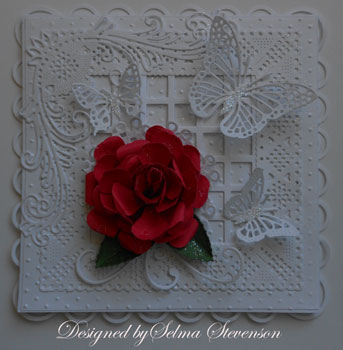
Today I am back to my first love -- creating flowers and doing lots of layering using pretty dies.   Joan's Gardens has such a great variety of the Cheery Lynn dies and I sure used a lot of them on my card today.  First the background piece was embossed with the Swiss Dots embossing folder.  The Dainty Dutch Deco Frame (DL141) frame was die cut.  This frame leaves an open center so I wanted to add some texture; I die cut the "Small Window Frame (FRM114) and cut off what I needed to place behind the opening. Don't you like that look! This was placed over the Swiss  Dots background so you can now see those dots through the Window Frame.  Many of you told me you love this "Victorian Romance Flourish (DL 151) that was added to the top left corner.  It is such a beautiful flourish and I love to use it.  Can you see that pretty little doily under the rose?  It was a doily in the center of the "Dainty Dutch Deco Frame".  You get two dies in one!  Just the scalloped edge of that little doily peeks out from under the flower, but that was all I wanted, so it worked perfect.  

The red rose was created using the Medium Pear punch, the Flower Tool Kit and shaping mat you can get from Joan's Gardens.  Joan knows how much you all love this tool kit and she has a hard time keeping them in stock, but she does get new shipments weekly.  All the components were attached to the card then three Cheery Lynn butterflies were added.  The larger butterfly is the "Exotic Butterfly small" (DL113) and the two smaller butterflies are the "Mini Butterflies (DL112).  Can you see those three flourishes coming out at the bottom of the Rose?  These were flourishes that came out of the "Victorian Romance Flourish" -- this is an additional bonus you get from one die.   Ultrafine diamond glitter was added to the center (body) of each butterfly to finish off the card.  Oops -- forgot to tell you I used the Martha Stewart "Doulbe Arches" border punches to add a frame to the back of the card.  As you know, you can get all your Cheery Lynn Dies and tools for creating your own flowers from Joan's Gardens I received a package from Joan today with lots of new products I am excited to share with you soon. 

Thank you for coming by to visit my blog.  I noticed last week I went over the 300,000 visitors count - WOW!  I love your visits and all your comments.  

Hope you are enjoying your long weekend!


7324

Friday, September 2, 2011

Graphic 45 ABC Primer


Have you seen all the new Graphic 45 stamps and paper that is now posted at Joan's Gardens?  Today I am using stamps from the Graphic 45 "An ABC Primer 1" stamp set and design paper from the "An ABC Primer" Collection.   

To start with, I cut down a piece of the design paper to create my background.  The "A was for Apple Pie", little girl, and "School Days" were all stamped, colored with Copic markers and cut out.  They were distressed with Tim Holtz "Tea Dye" Distress ink.  Lines were drawn around the "A was for Apple Pie".  A big red flower was created using Tim Holtz Sizzix "Tattered Florals" die.  The leaves behind the flower is from the Cheery Lynn "Judy Blooms" (C184) die.  All pieces were layered and a black and white gingham bow added to complete the card.  All products used on this card can be purchased from Joan's Gardens.

Joan has been adding lots of other new products to her blog.  I hope you will go over to Joan's Gardens and check them all out.

6812

Wednesday, August 31, 2011

Graphic 45 Pop-Up


 Today I have created another pop-up card.  This time I have used the Sizzix "Zig Zig " Pop-up die, Graphic 45 stamps and Marianne Designs dies.  We are having overcast weather and it was really hard to get a good clear picture of this card.


For the inside I stamped the background with some new Graphic 45 stamps and antiqued it with Tea Die Distress Ink.  The bottom section has a piece of design paper from the Graphic 45 "Christmas Emporium" paper pad.  The pop-up was die cut and distressed with "Tea Dye" ink.  The two girls were stamped and lightly colored then sponged over to also give them the "aged" look.  They were attached to the left tab of the pop-up with ScorTape.  Two Marianne trees (LR0136) were die cut, sponged, and attached to each other with a glue dot then attached to the right tag of the pop-up.  I wanted the Graphic 45 sentiment to also be a pop-up so created a little tab I could glue to the bottom of the card and the back of the sentiment.  It folds down flat when the card is closed.  In order to include a personal note and signature, I die cut the Marianne (LR0117) rectangle doily on the bottom panel.  It was also distressed.  The poinsettia up on the left side corner was created with the Marianne Poinsettia dies (LR0142) dies. 

This is the front of this pop-up card.  I used a piece of old Christmas design paper from last year for the background.  The gold embossed stocking is from one of the new Graphic 45 stamps sets.  You can see all the images in these new sets at Joan's Gardens.  The image was cut out with a Spellbinders Labels 8 Nestability die.  A Spellbinders accent was added to the top and bottom of the Label 8.  Another Marianne Design poinsettia was created out of burgundy card stock.  The flourish is one of the Marianne Decorative Flourishes (LR0157).  It was cut in half and tucked under the poinsettia.  The border across the middle was created with a Martha Stewart border punch.

Have you been over to Joan's Gardens today to see all the new products added?  You will find the new Graphic 45 stamps and paper, Tim Holtz stamps, Marianne dies and new paper pads I think you will really like.

6044


Tuesday, August 30, 2011

Mum Tutorial Using Cheery Lynn Sunflower Die


This past weekend Joan (Joan's Gardens) had everyone complete the gorgeous card below.  There were several new techniques she learned at CHA that she wanted to teach on this card and she asked me to design an easy mum she could also teach them to make.  I decided to use the Cherry Lynn "Sunflower" die (DL121).  I think you will love this quick and easy way to create a mum using a die intended for creating pretty sunflowers.


 This is the card Joan designed for the workshop.

First I will give you the information about the card above, that I designed, then give you a mini tutorial below on how to create the mum.  This is a 5 1/2" card.  The design paper is from the BoBunny "Forever Fall Collection".  The pretty rectangle doily behind the flower is the Marianne (LR0117).  On the right side of this pretty doily I stamped a sentiment from the JustRite "Seeds of Kindness" stamp set.  The dragonfly is the Cheery Lynn "Small Dragonfly with Angel Wing" (DL152).  The lacy portion of the dragon fly was die cut using burgundy card stock and the Angel wing was die cut using dark green card stock.  Dark green Stickles was added to the angel wing.  The flower was created as shown below out of burgundy card stock.  The flourish is the Cheery Lynn "Tropical Flourish" (B127).  It was die cut using brown card stock and highlighted with gold.  Green punched leaves were added around the flower.  Off white seam binding was colored using Distress Inks and a Webster's Pages button was added. 

Now for the tutorial on how to create a Fall Mum using the Cheery Lynn Sunflower Die.

 Die cut eight sunflowers with the Cheery Lynn Sunflower die shown on the right of the die cut flowers.  You don't need to die cut the center of the sunflower which is the circle on the bottom of the sunflower.  You can use any fall color for this flower.

 You need to condition the center of the flowers using the large white shaping tool from the Flower Tool Kit.  You want "cup" each flower.  Two of the flowers should be misted with water and folded up to create a tight center for your mum.  The paper will bend and shape better if it is slightly damp.

Start gluing the six sunflowers together and press down with the top of the tool's handle from the Flower Tool Kit.  Press all around the center pushing down into the black shaping mat.  Glue the two centers you have created together, pressing down into the black mat to shape well.  Add glue to the center of the stacked flowers and press the center down using the small stylus and pressing down right in the center.  You should have a flower that looks like the picture below.  (For some reason the flash went off when I took this picture and it has changed the color.)

 This is how the completed flower will look.

I love to find different ways to use my stamping tools.  I think you will have fun creating pretty sunflowers with this die and also pretty mums. 

As you know, all products I use can be purchased from Joan's Gardens.

5405

Monday, August 29, 2011

Tutorial on how to Create an Organza Flower with a Heat Gun


Are you ready to learn something I have never seen before!  I have seen others create beautiful flowers out of organza material and they always use a candle to melt the edges of each petal. Joan (Joan's Gardens) wanted to create one of these flowers in her workshop but didn't want to have lit candles in the workroom so I came up with a "bright" idea.  Why not try using the heat gun to accomplish this task.  I tried it and it worked beautifully.  The way I did it was to melt the edges of the petals  by holding each petal down with tweezers and quickly pushing the heat gun up to the end of the material.  If you hold the tweezers close to the end it will only melt up to the tweezers.


 My first flower heating the edges with the heat gun and using tweezers.  I used red organza.


 My second flower using the same technique using white organza.

  During the workshop, Joan found a quicker way to accomplish melting the edges of the petals using the heat gun and I'll show you the steps below.


To start we used the Tim Holtz Tattered Florals die and 8 layers of organza material.  The material tears easily the width you need and it helps make sure the pieces are the same width.  Fold the material over to create 8 layers that fit right above the flower you want to cut out.  I actually tried cutting 16 flowers at once in my Vegabond and it cut them perfectly. 

 I used the largest flower on the die for this flower.  Two flowers were offset.  Joan told me in the workshop that she laid all 8 flowers down, alternating the petals for this step, and it worked great - all eight layers done at once.  I only used two at a time and that is what is in the picture above.

Use a can that is a little smaller than the flower, placing it right in the center.  Some edges of the petals need to be sticking out all the way around.


Next take your heat gun and as soon as it is hot, quickly push it up to the petals and they will shrink up to the can.  You need to be working on your Teflon Craft Sheet because it is heat resistant.  Quickly push the heat gun up to the petals, and pull back as soon as they start to melt, going all the way around.  It just takes a second for the edges of the material to melt.  If the petals stick together, you can easily pull them apart.

Using the same size petals, you can create a smaller flower by using a smaller can.  I used an empty tomato paste can.  I used these petals on top of the petals heated using the pop can.  For the very center, I used some of these smaller petals and put the heat gun down toward the very center, very quickly, and it "crinkled" the flower up even more which added to the fullness in the center of the flower.  The heat gun can get very hot, so you want to make sure you are using a very quick motion when you go toward the organza.  Using the heat gun to melt the edges of the material makes this project go very quickly and you don't have to worry about catching the material on fire if you use a quick motion to melt the edges.

Once all the petals have been "melted", you can create your flower.  Alternate the petals stacking as many layers as you want for fullness.  You can use either a Tim Holtz Tiny Stapler or a Needle and Thread and put a few stitches right in the center.  You can add whatever you want in the middle such as a pretty button or pearl(s).  

In case you are interested, I will now tell you all the info about how I created this card.  It is a 5 1/2" card.  The background is a piece of K&Company design paper.  I created a white organza flower but did not want it white.  Joan sent me some Ranger Perfect Pearls "Cappuccino" Mist.  I love the color so sprayed my flower to see what would happen.  I love the soft color.  The lace trim under the flower is from a package of Websters Pages trim.  Both this trim and the ribbon were white and I sprayed them with the Cappuccino Perfect Pearls.   For the filler behind the flower I used some Marianne dies:  the "Forest Branch" (LR0150) and both the "Decorative Elegance" pieces (LR0 157).  The colors used were pulled from the design paper.

I hope you like this new discovery Joan and I had fun with and enjoy creating your own pretty flowers.  You won't want to miss seeing the workshop projects Joan has posted on her blog.  You will see this flower on the Pop-up Christmas card they completed.  Can you believe she does an all day workshop and it is free.  This month she taught many new techniques she learned at CHA  and used new products she will be posting to her blog this week.   She will have another workshop in October so if you would like to attend, be sure to email her and let her know.  She is now having three workshops - Friday, Saturday, and a shorter workshop on Sunday.  She always has new techniques to teach and allows  you to work many new products out on the market.

As you know, all products I use can be purchased from Joan's Gardens

I will have another tutorial for you tomorrow.

4557
 

LinkWithin

Related Posts with Thumbnails